SQL Server patching
SQL Server Patch Manager can apply (and remove) cumulative updates, service packs and hotfixes in parallel from multiple SQL Servers at a time.
SQL Server Patch Manager will automatically control failovers if patching server pairs where either Database Mirroring or Availability Groups are used.
Patching of all SQL Servers in an organization using the SQL Server Patch Manager can usually be done within 10 minutes. This drastically reduces downtime compared to patching through solutions like SCCM.
SQL Server Patch Manager is located here:
\\PerformanceStoreServer\Tools\SQLServerPatchManager\SQLServerPatchManager.exe
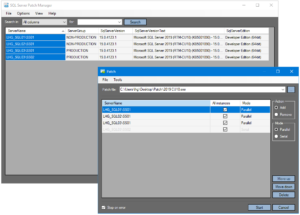
A log of patched SQL Servers can be seen in the dbo.v_patch_log view or in the Patch log dashboard.

SQL Server Patch Manager can make a backup of the system database files before and/or after patching. This can be enabled in the “Options” menu.
The backed up system database files will be in the “DataRoot” directory (usually “C:\Program Files\Microsoft SQL Server\{Instance name}\MSSQL”) in the systemdb_yyyyMMdd_HHmmss.zip compressed file.
Note, the SQL Server Patch Manager is only supported on Windows platforms with support for WMI calls. WMI calls requires the Performance Store user to be a member of the local administrators group on the SQL Server.
It is not necessary for the users of the SQL Server Patch Manager to be sysadmins on the SQL Servers. To allow a specific AD group to use the Patch Manager do the following in the next section.
Dedicated SQL Server Patch Manager team
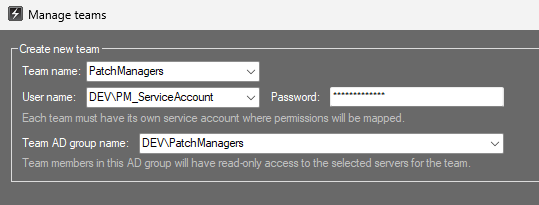
If a dedicated AD group for the SQL Server Patch Manager users does not exist, then create it in AD. In this example we will call the AD group “PatchManagers”.
Create a dedicated service account in AD to be used for the SQL Server Patch Manager team in Performance Store.
Create a new team in the Performance Store Control Center:
Add the servers to the new team, that the team should be able to patch:

The new AD group (DEV\PatchManagers) will automatically be added to the Performance Store database. Grant db_datawriter to the AD group in the Performance Store database (as patching information will have to be written to the dbo.patch_log table).
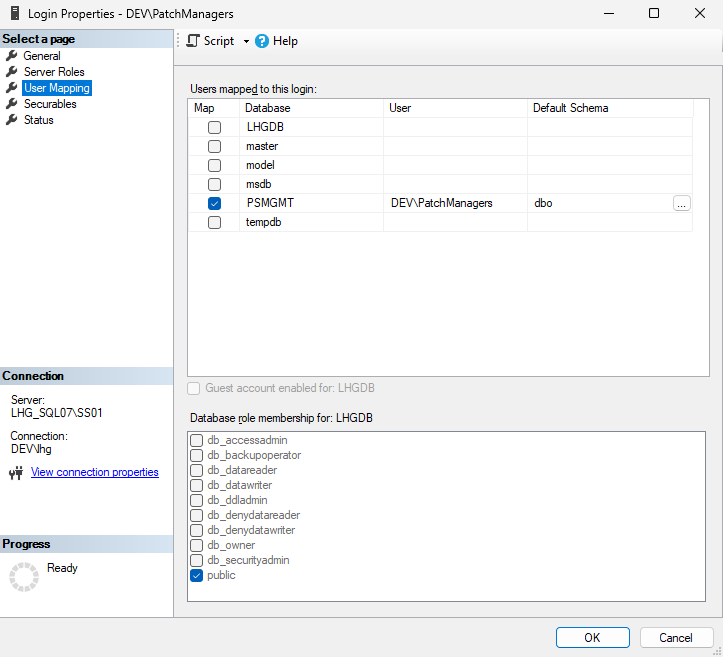
On each SQL Server that should be patched, add the new AD group (DEV\PatchManagers) as a login on the server, and grant VIEW SERVER PERFORMANCE STATE permission to the group. Map the AD group to the Performance Store management database (it should not be a member of any role):
Now the users in the AD group will be able to patch the given SQL Servers.