In rare cases, errors about log files that cannot be deleted might be seen in the SQL Server log:
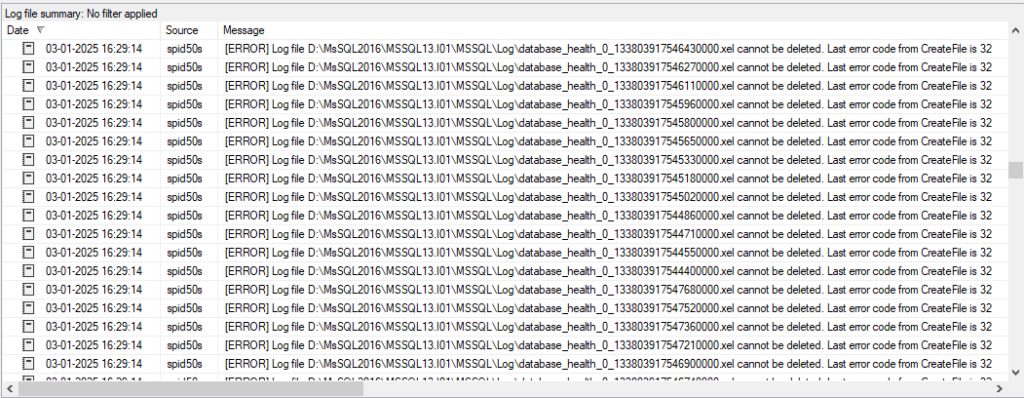
The errors are: [ERROR] Log file [file name].xel cannot be deleted. Last error code from CreateFile is 32
Why are the errors comming?
Looking more closely at the actual .xel files, it can be seen that the .xel files are created very rapidly (“Date modified” is the same for all files):
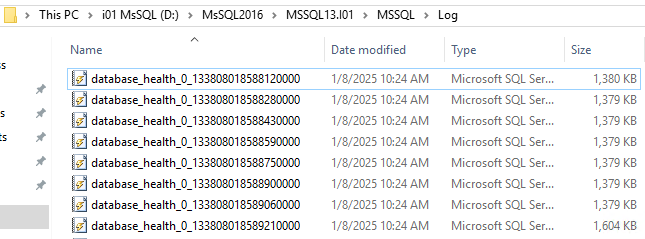
When the .xel files are created so rapidly, it can be an indication of either many small statements appearing very rapidly, or few statements that are very large (having a statement text of e.g. 1.5 MB).
E.g. a sql statement text is 1.5 MB, but contains an error. 3 of such statements are executed. Since the default file size of the .xel files is 2 MB, each .xel file can only contain 1 error statement (that includes the sql statement), thus creating 3 .xel files.
By default, Performance Store creates 10 .xel files, each with the size of 2 MB. The oldest .xel file will be rolled over when a new .xel file is created. SQL Server will automatically delete the oldest .xel file, when the new .xel file is created.
Example: SQL Server creates 10 .xel files with the names example1.xel – example10.xel. Suddenly 10 new .xel files are rapidly created with the names example11.xel – example20.xel. SQL Server will automatically remove the old .xel files that are older than example11.xel. This means SQL Server will get the instruction to delete the files example1.xel – example10.xel. In the meantime, 10 new .xel files have been created with the names example21.xel – example30.xel, and SQL Server is then instructed to delete the files older than example21.xel.
From the first delete request, SQL Server is deleting the example1.xel – example10.xel files, and might only have physically deleted example1.xel – example5.xel. In the second delete request, the SQL Server is still instructed to delete the files example1.xel – example20.xel, but example1.xel – example5.xel is now missing since they were deleted in the first delete request.
This will create the errors shown in the SQL Server error log. When SQL Server is deleting the files, it should check if the file exist before trying to delete it, but until this is fixed (if ever), the errors will be shown in the log. Since the files that do exist are actually deleted (although the same files are requested to be deleted from multiple delete requests), no leftover files are remaining in the file system.
How to fix
To determine if the cause of the issue is due to many small rapid statements or if it is very large statements that cannot be contained in the buffer, use the dbo.v_xe_info view.

The event_loss_reason column shows the actual cause of the issue. In the above picture, the largest_event_dropped_size is 923971 which is larger than the regular_buffer_size of 720691. In this example, the reason for the issue is that very large statements can not be written to the buffer.
To make sure that very large statements or many very rapid statement executions are stored correctly within the .xel files and retrieved before they are rolled over, parameters can be set in the dbo.xe_session_info table.
In the dbo.xe_session_info table the default file size of .xel files can be changed from 2 MB to e.g. 10 MB by changing the max_file_size value, allowing the .xel files to store more data. Remember, the larger the .xel files are, the longer the collection time will be. See Optimizing collection performance for more information.
After changing values in the dbo.xe_session_info table, a reinitialization of monitoring must be done in the Performance Store Control Center.
To read more about the difference between max_memory_kb, max_event_size_kb and max_file_size, see: CREATE EVENT SESSION (Transact-SQL) – SQL Server | Microsoft Learn