Performance Store will by default kill user sessions that are blocking Performance Store operations for 5 minutes or more. This can be configured in the Performance Store Control Center:
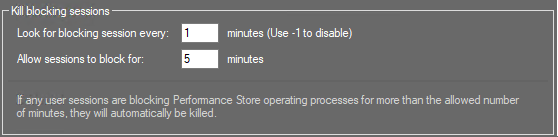
To disable the functionality, set “Look for blocking sessions every” to -1.
User sessions can operate in the Performance Store database for more than 5 minutes, but only if they are blocking Performance Store operations, they will be killed.
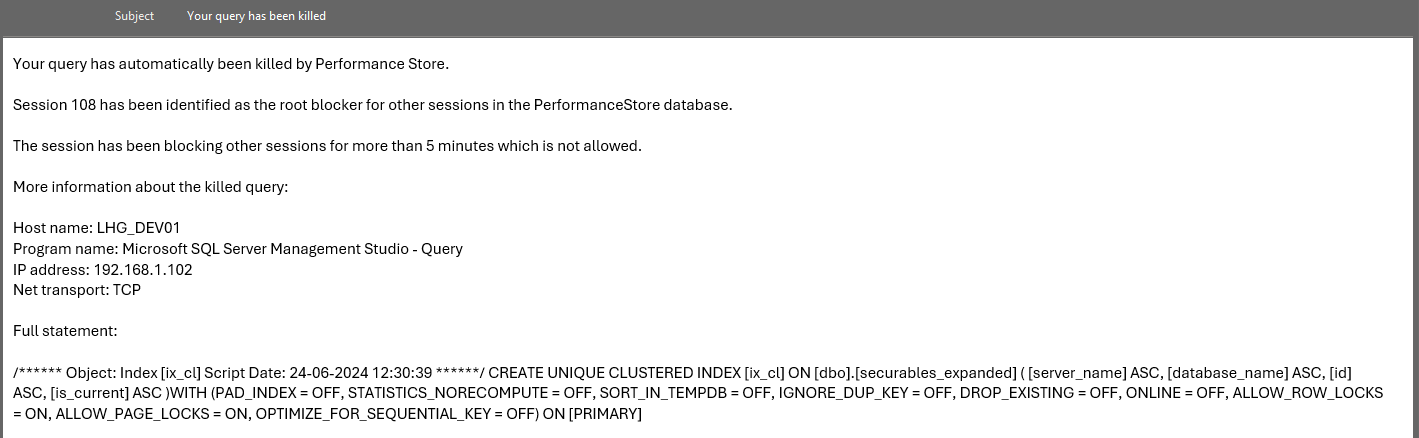
When a user session is killed, an email with information will be send to the user. This requires, that Mail configuration is set in the Performance Store Control Center:

Note, the user’s email property must be set in AD for the user to retrieve the email.
Example email send to a user which session has automatically been killed:
To exclude user sessions from being automatically killed, the login_name of the user session can be added to the dbo.kill_blocking_sessions_whitelist table.
Killed session are added to the dbo.killed_sessions_log table.