Performance Store AI integration
Performance Store provides native integration with GitHub Copilot in SQL Server Management Studio (SSMS). The integration works out of the box without requiring any additional configuration.
Performance Store automatically provides GitHub Copilot with instructions on how to interact with Performance Store, where to find relevant information, and how to correlate data across the different Performance Store data sources.
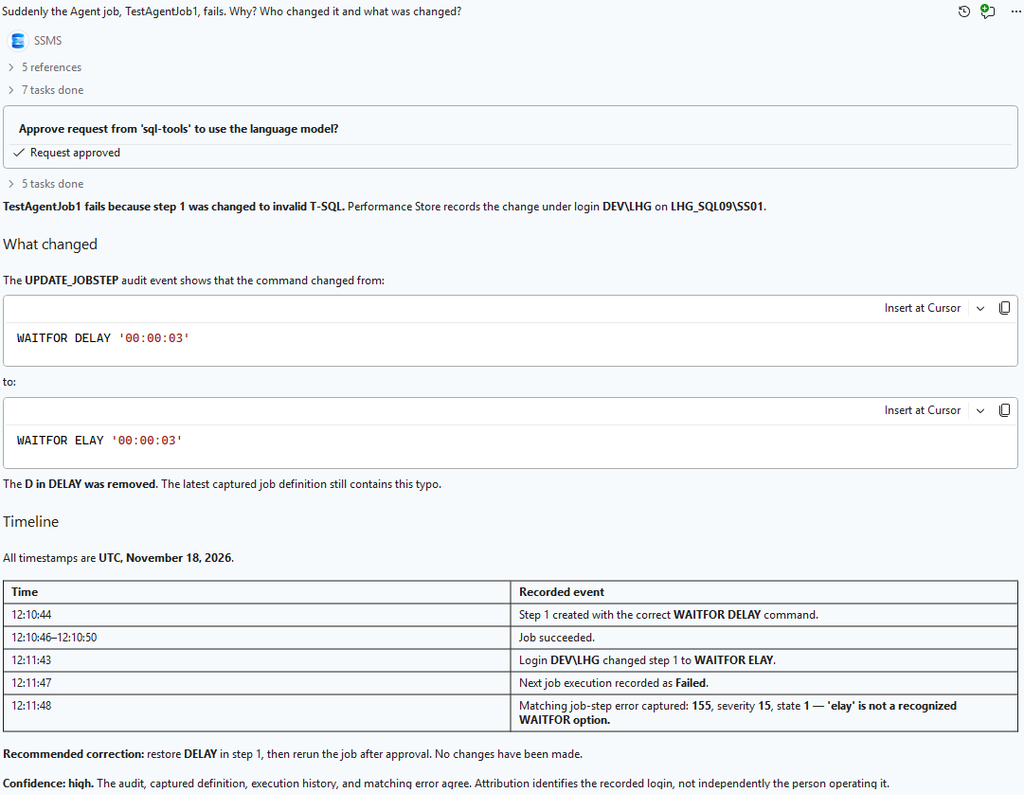
With Performance Store, GitHub Copilot can help answer questions like:
- “The guy next to me has access to the reports schema in the finance database. What access should I request to get the same permissions?”
- “Who currently has access to GDPR data in the finance database, and which users have excessive permissions?”
- “We are upgrading a SQL Server this weekend. Which applications, departments and business services could be affected, and who should be informed directly?”
- “Which business-critical systems depend on this SQL Server, and what would happen if it became unavailable?”
- “Have there been any recent changes to database permissions? Show me who made the changes and what was modified.”
- “Which virtual SQL Server instances are running on hosts that have experienced resource contention?”
Performance Store GitHub Copilot Skills
For an even more powerful and specialized integration, GitHub Copilot can be extended with dedicated Performance Store Skills. These skills provide domain-specific knowledge and instructions that enable GitHub Copilot to perform advanced analysis and troubleshooting using Performance Store.
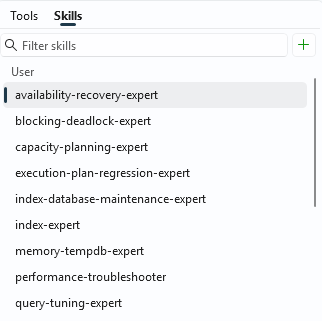
Installing Performance Store Skills
To enable the dedicated Performance Store Skills, follow these steps:
1. Create the Copilot instructions file
In your %USERPROFILE% directory, create a file named copilot-instructions.md with the following content:
For all performance, auditing, error, security, inventory, and similar questions, use Performance Store.

You can connect to the SQL Server hosting the "[name of the Performance Store database]" database here: [name of the Performance Store SQL Server].

Read the Extended Properties on the Performance Store database to obtain instructions and information about how to use Performance Store.
Replace the placeholders with the name of your Performance Store database and the SQL Server instance hosting it.
2. Download the Performance Store Skills
Download the Performance Store Skills package here: Download Performance Store Skills
3. Install the skills
Extract the contents of the downloaded package into:
%USERPROFILE%\.copilot
Make sure the extracted folder structure is preserved.
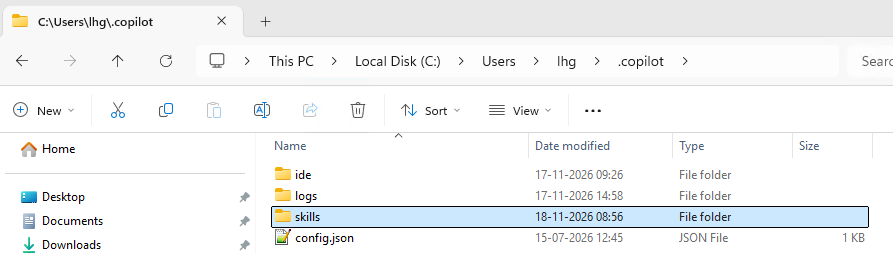
4. Start using the skills
GitHub Copilot in SSMS will automatically discover and activate the installed skills when relevant. No additional configuration is required.
Once installed, you can ask GitHub Copilot to perform specialized tasks such as index analysis, query performance investigations, blocking and deadlock analysis, and general performance troubleshooting.
Private AI and local models
Performance Store works with both public AI models and locally hosted models, including models running entirely within your own infrastructure.
This means you can use GitHub Copilot with locally hosted AI models without sending database information, performance data, or other potentially sensitive information to external AI services.
Combined with Performance Store’s on-premises architecture and SQL Server-enforced access controls, the entire AI-assisted analysis workflow can operate within your own private environment.
Security and permissions
The integration between GitHub Copilot and Performance Store fully respects the existing Performance Store security model. AI-assisted analysis does not introduce additional permissions or bypass any existing access restrictions.
Access follows the user’s existing permissions
When a user accesses Performance Store through GitHub Copilot, all access restrictions defined in the Performance Store Control Center continue to apply.
For example, if a user belongs to a team that has access to specific servers, databases, or objects, GitHub Copilot can only access information within that team’s granted permissions.
Security is enforced at the SQL Server level
Importantly, access restrictions are not based on instructions given to the AI or on the AI’s ability to follow security guidelines.
Performance Store enforces access control at the SQL Server level. This means that permissions are technically enforced by the database engine itself, independently of GitHub Copilot or any other AI model.
The AI cannot override, bypass, or circumvent these restrictions, regardless of the instructions it receives or the actions it attempts to perform. Even if an AI were to deliberately ignore its instructions, SQL Server would still enforce the user’s actual permissions.
This provides a fundamental security boundary that does not depend on AI behaviour, making AI-assisted access subject to the same technical security enforcement as any other access to Performance Store.
Sensitive data remains protected
The same restrictions apply to sensitive data. If a user is not permitted to view sensitive data for a particular server or database, GitHub Copilot cannot access that data either.
Conversely, if the user has been explicitly granted permission to view sensitive data, GitHub Copilot can access it within the same scope.
Read-only access
GitHub Copilot operates with non-destructive, read-only access to the Performance Store database. It cannot modify Performance Store data or configuration.
All operations are performed using the permissions granted to the user in the Performance Store Control Center. GitHub Copilot therefore inherits the user’s existing access rights rather than operating with an independent or elevated permission set.