Synchronize Availability Group objects
Alerts will be thrown, if two SQL Servers are a part of an Availability Group, and there are differences in the objects between the two servers:
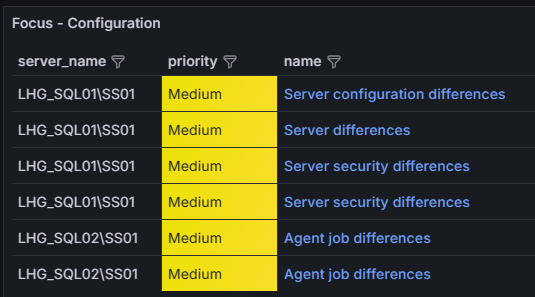
To get a SQL script that synchronizes logins, users, roles, authorizations, securables and agent jobs between a primary and a secondary, use:
exec dbo.s_get_ag_sync_script '[server 1]', '[server 2]'
It does not matter if the primary server is given as the first or second parameter in the above script. The output from the script will always be the one to be executed on the secondary server.
Note, the script will not perform any changes itself, but only return the SQL statement for manual execution.
The script will do the following:
- Missing logins, users, roles and agent jobs, that exists on a primary but not on a secondary, will be created on the secondary.
- Logins, users, roles and agent jobs that exists on the secondary but not on the primary, will be deleted.
- Securables and authorizations will be synchronized from the primary to the secondary.
- If there are differences between logins, users and roles with the same name on the primary and secondary, the logins, users and roles will not be replaced with the ones from the primary.
- If there are differences between agent jobs with the same name on the primary and secondary, the agent jobs will be replaced with the ones from the primary.
- If password hashes for SQL logins are set to not be retrieved, SQL logins will not be created. If password hashes should be retrieved or not can be set in the Performance Store Control Center.
- Agent jobs with steps set to run in a non-existing database will not be created.
- Logins with a default database that does not exist will not be created.
- The primary server must be in the “AG_ALLPRIMARY” state and the secondary server must be in the “AG_ALLSECONDARY” state to be included.
Servers will not be in the “AG_ALLPRIMARY” state or “AG_ALLSECONDARY” if they contains databases that are not in an Availability Group. Sometimes this scenario is still correct if e.g. management databases are present on the servers, and these databases should not be included in the Availability Group. In such case, such databases can be added to the dbo.allow_as_not_clean table, whereas the server will change state to “AG_ALLPRIMARY” or “AG_ALLSECONDARY“.
Automated Availability Group objects synchronization
Security objects and Agent jobs can be set to be synchronized automatically between replicas. Synchronization is disabled by default. Synchronization will only be from the primary to the secondary.
E.g. if a user is created in the master database on the primary replica, and an Agent job is deleted, the user will be created on the secondary replica, and the Agent job will be deleted on the secondary replica.
All security objects will be synchronized. This includes server- and database-level authorizations, permissions, grants, role memberships etc. The same rules applies for the automated synchronization functionality as for the manual method.
To enable automated synchronization, set a value other than -1 in the “Synchronize secondaries” section on the “Timers” tab in the Performance Store Control Center:

Multiple values can be separated by comma:

To disable the automated synchronization (default setting), set the value to -1:

Note, when enabling the automated synchronization feature, the Performance Store user will be added to the sysadmin group. When disabling the automated synchronization feature, the Performance Store user will be removed from the sysadmin group. The Performance Store user will need sysadmin rights to be able to e.g. delete Agent jobs.
Membership in the sysadmin role will only be granted for servers that fullfill the following requirements:
- The server is not added to the dbo.sync_secondaries_exclude table (in any column).
- The server must have an Availability Group.
To exclude servers from the automated synchronization functionality, add the server to the dbo.sync_secondaries_exclude table. When adding or removing servers from- and to the dbo.sync_secondaries_exclude table, monitoring must be reinitialized on the affected servers in the Performance Store Control Center.