Realtime activity data
Performance Store makes it possible for teams to see realtime activity data directly on the SQL Servers they have access to.
Realtime activity data corresponds to data in the dbo.v_activity view and on the Activity dashboard. This include query plans, live execution plans, run time estimations, and all other information.
The difference between the dbo.v_current_activity view and the “Activity (current)” dashboard is that those are near-realtime, but is not true realtime due to the sample based nature.
For teams where data is set to be unmasked in the Performance Store Control Center, users in those teams will be able to query realtime activity data directly on the SQL Servers.
When enabling unmaskes data for a team, nothing is changed on the monitored SQL Servers, e.g. no security settings will be changed on the SQL Servers.
The realtime activity data feature in Performance Store solves the problem with users needing direct access to SQL Servers, often with elevated permissions. Even permissions like VIEW SERVER STATE or VIEW SERVER PERFORMANCE STATE can expose potentially sensitive data. Performance Store makes the access controlled and in alignment with existing policies for letting users see unmasked data, this includes restricting access to see realtime activity data for specific databases on a server. The access restrictions are based on SQL Server-side authorizations and not frontend filtering.
Database-scoped realtime activity monitoring
Performance Store enables database-level access control for realtime SQL Server activity data. Teams can access the same powerful diagnostic information traditionally available through server-level permissions, while being restricted to individual databases and with independent control over access to sensitive, unmasked data.
Unlike the traditional SQL Server permissions VIEW SERVER STATE and VIEW SERVER PERFORMANCE STATE, which provide visibility at the server level, Performance Store can restrict realtime activity data access to specific databases.
This allows organizations to delegate performance troubleshooting and diagnostics to individual development and support teams without exposing activity from other databases on the same SQL Server instance.
Access can be configured independently at both server and database level:
- Server-level access: Grant a team access to realtime activity data across the entire SQL Server instance.
- Database-level access: Grant a team access only to selected databases. Realtime activity data returned to the team is restricted to those databases.
- Unmasked data: Independently control whether a team can see sensitive information, such as SQL statement text and other potentially sensitive data, for each server or database.
This makes it possible to provide teams with extensive diagnostic capabilities while maintaining strict separation between databases, applications and organizational units.
For example, multiple application teams can share the same SQL Server instance while each team is granted access exclusively to the databases they are responsible for. A central DBA team can retain access to all databases, including unmasked activity data, while individual teams receive only the access they need.
All authorization is enforced directly within SQL Server, ensuring that database-level restrictions are applied regardless of how the procedure is invoked. No server-level diagnostic permissions need to be granted to individual users.
Requirements
Users will have to have a login on the SQL Server where the user wants to see realtime data. A simple login without any further permissions is enough. The user can have access through an AD group mapped as a login on the SQL Server.
Performance Store is not creating this login, nor does it change anything on the login, when it has manually been created.
The realtime activity data feature requires SQL Server 2016 SP2 or higher (including SQL Server Managed Instances).
How to query realtime activity data
In any database context, execute:
exec PSMGMT.dbo.s_activity
Where PSMGMT is the name of the Performance Store management database.
By default, the resultset is sorted by the total_elapsed column in descending order. To specify the sort column and direction, use:
exec PSMGMT.dbo.s_activity @sortcolumn = 'logical_reads', @sortdirection = 'desc'
@sortcolumn can be the name of any returned column, except query_plan_xml and query_plan_lqs.
@sortdirection can be either asc or desc.
How to enable querying realtime activity data
In the Performance Store Control Center, choose a team, and choose the servers that the team members should be able to query realtime data for. Choose to unmask data for these servers:
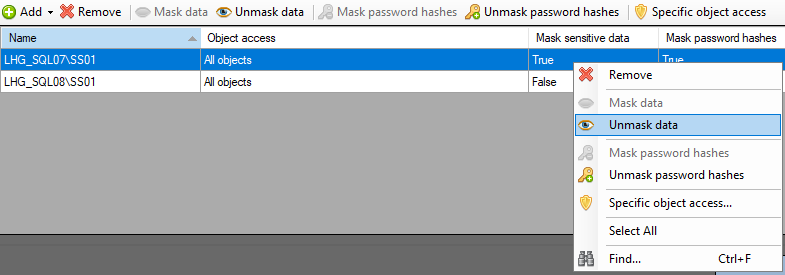
To disable querying realtime activity data, choose to mask the data.
Note, by default data is unmasked for non-production servers, which by default enables querying realtime activity data for non-production servers. If chosen to mask data for non-production servers, querying realtime activity data will be disabled.
For servers where team access has been set for specific objects, these servers will have realtime activity data querying enabled for those specific objects only. E.g. if a team only has access to unmasked data in DatabaseABC but not DatabaseSuperSecret, then realtime activity data will only be shown for DatabaseABC.
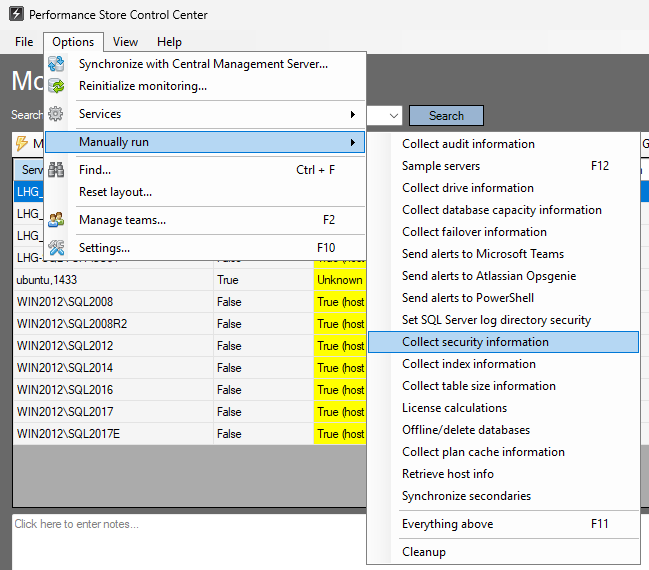
When enabling realtime activity data, it will be enabled for the team members that is active in the team at the time of enabling it. If new team members have just been added to the team, and those team members should be able to query realtime activity data, do a security collection beforehand:
Realtime activity data will only be enabled on servers where monitoring is enabled and the server is available at the time of activating the realtime activity feature. If enabling monitoring on a server after activating the realtime activity data feature, reinitialize the server to have realtime activity data available on that server.